HootBookRequest early access

HootBook · Architecture

Your journal.
Your devices.
Your choice of AI.

Intelligence belongs in the page you’re writing. HootBook keeps your journal on your devices and connects to your chosen AI when you ask.

Here’s where your words go, what moves between devices, and what you choose to share.

Follow the paths below ↓
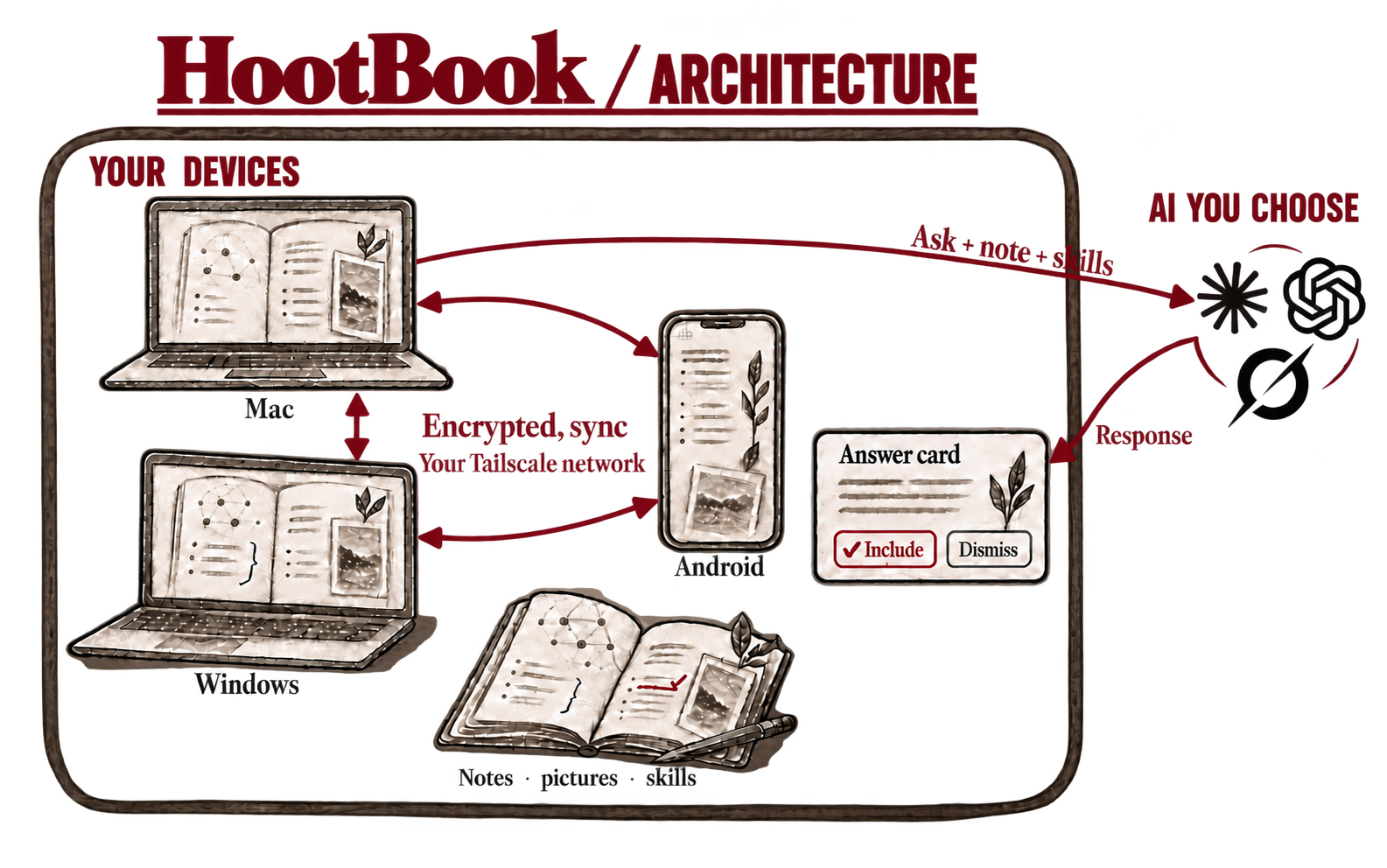
Mac, Windows and Android exchange encrypted changes inside the personal-device boundary. Chosen AI is shown with Claude, OpenAI and Grok marks outside it. An ask goes out; a response returns to an answer card inside.
Architecture illustration · the default inline AI flowOpen full size ↗

01 / On your devices

A journal of your own.

Write in Markdown. Keep pictures, links and meeting notes beside the thought they belong to. Search your pages and follow your tags. The journal works with or without AI.

Start on a Mac or Windows PC. Every device you enroll keeps your note text. Computers keep the pictures too; Android loads them when needed.

02 / Between your devices

Keep your pages together.

HootBook exchanges encrypted changes over your own Tailscale network. The device that starts your journal approves each new device that joins.

Windows and Android sync while HootBook is open. On Mac, optional Anchor keeps it available after the window closes. If edits conflict, both versions are kept for you to resolve.

03 / When you ask AI

Help, in the page.

On Mac or Windows, start a line with //. The open note, saved instructions you turn on (Skills) and the context you add go to your chosen provider. Earlier asks in that note can also be included. It is not a search of your whole journal.

By default, the answer waits on a card. Include it, dismiss it or ask a follow-up. You can turn on direct writing for prose replies in settings.

Two different connections

Private sync.
AI you choose.

Sync carries encrypted changes between your approved devices. An AI ask shares content with an outside service. Your provider’s terms govern what it keeps.

See what each connection shares →

Choose the help you want.

Use Claude through Claude Code, ChatGPT through Codex, or an OpenAI, xAI or MiniMax API key. Change providers without moving your journal. Models and features depend on the service you choose.

Protect the device, too.

The journal has an encrypted history, but readable Markdown, search data and keys also live on your device. Use disk encryption and a screen lock. Software running under your login can read local notes and keys.

Read the security model →

Speak it. Keep it.

Transcribe meetings.
Talk through a thought.

Transcribe speech into HootBook on your Mac or Android device. Speech recognition runs on the device. Optional AI refinement is off by default; enabling it shares the finished transcript and any related context you choose.

A voice conversation is a separate connection. Your chosen OpenAI or xAI service receives microphone audio and any notes the agent reads. When asked, it can find, create, tag and add to notes without a second confirmation.

Explore voice and transcription →

The meeting and the thinking

Your calendar.
The pages behind it.

See appointments beside your journal. Start a meeting note from an event, or link a page you already have. The event’s title and time stay with the note as it syncs.

Linking a page does not send its contents to the calendar or attendees. Changes to calendar events wait for review and confirmation. A calendar AI request can share text from the open note, your question and calendar details with your chosen provider.

Google Calendar works on Mac and Android. Mac also connects to calendars available through macOS.

What stays in your hands

Keep it. Shape it.
Make a backup.

Your words are Markdown.

Notes stay portable. HootBook’s code is Apache 2.0 licensed, so you can use it, modify it and build on it.

Your agents can work here.

On Mac, the optional HootBook command line lets scripts and AI agents read, search and work with notes through the running app. Writes are off until you enable them on that Mac.

Sync is not a backup.

Keep an encrypted Backup pack and its passphrase somewhere safe. It includes notes, Skills, pictures and drafts. Removing a device stops new sync; it does not erase the copy already there.

The current public preview

Pick up where
you left off.

Mac

Apple silicon · macOS 14.2+

Journal, inline AI, local transcription, voice and calendar. Optional Anchor and command line.

Windows

Windows 11 · x64

Journal and inline AI. Transcription, voice and Google Calendar are not available in this preview.

Android

Android 7.0+ · joins an existing journal

Journal, sync, voice and Google Calendar. No // asks. Local transcription requires Android 8.0 or later.

iPhone Coming soon

Optional browser access

Advanced users can enable browser access through an always-available Mac and their own forwarding server. It is off by default. The browser can read, write, search and ask AI, but it is not a sync peer and has no calendar.

Private. Personal. Living.

Begin with
a page of your own.

HootBook is in public preview in the US.

Mac, Windows and Android · US

Request early access